Hello Community -
👋 I've been admin for Ironclad's Ironclad instance for about 3.5 years now, and I've never been this excited about an admin feature. So we just released Bulk Reassignment ...
😎 How does it work? 😎 In the Dashboard, Admin can select workflows to reassign from one user to another. This is useful in situations such as when your company reorganizes, onboards/offboards new employees, or shifts work if an employee is out of office.
🤔 First impression 🤔 I started using the feature this week & absolutely loved it. It isn't a complex feature, though its impact on quality of life of an admin is huge. Continue to read below for my moments of user delight & things that aren't so obvious about this feature.
🤓 Deep dive 🤓
✔️ In the dashboard, Adam can select workflows directly next to the workflow names. You can do this in any view (woohoo!) and bulk-select by selecting the box next to the header row.
✔️ Next, click into the three dots on upper right hand corner, select "Reassign" option. A modal will pop up.
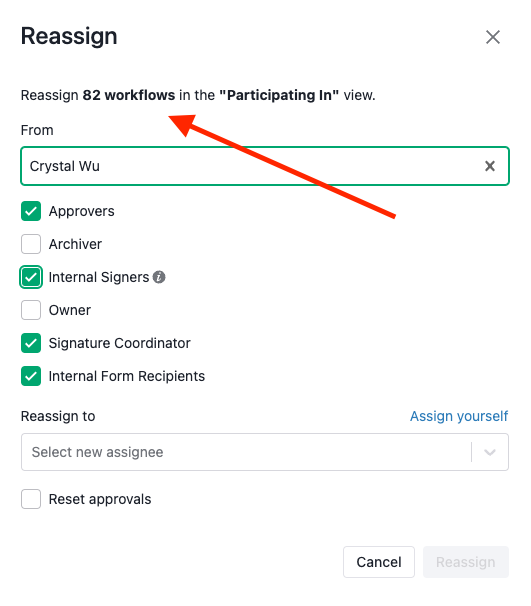
✔️ Now the fun begins where you can use the modal to customize the reassignment task. I love the intuitive buttons. You'll be able to see clearly & customize which role(s) to reassign (i.e., Approvers, Archivers, Internal Signers, Owner, Signature Coordinator, Internal Form Recipient).
 I also love that the modal tells you how many workflows are associated with each role (i.e. watch the # of WFs changes at the top of the modal & the dashboard changes in the background 😉).
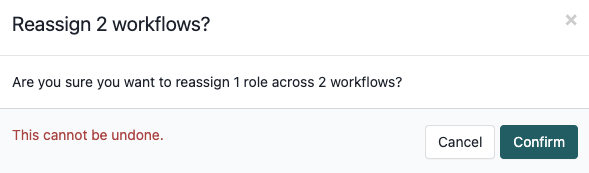
Next, you get a double-confirmation & warning *This cannot be undone* when you hit confirm 😅 I know I need this!
✔️ Finally, the reassigned workflows are automatically saved in "My View" so you can maintain as record or export as a local file. I love the view export, which can be used in internal messages to business users.
🤗 Hope you can check out this feature soon! For more details on our new releases, check out: https://support.ironcladapp.com/s/article/Q1-2023-Release-Notes
