I am in contact with support about an issue I have encountered with Workflow Tables in the Salesforce Integration that I wanted to share in case anyone else is experiencing a similar issue.
TL;DR: If our Workflow Launch configuration has a table that pulls in a single row based on criteria and the record that row is populated from is of an object that the Ironclad Workflow has a lookup to, the Id for that record will be written back to the lookup field on the Workflow record in Salesforce. We don't want that, because we can't assume these records are related in a way we have set up for our use case.
On our Ironclad Workflow object in Salesforce we have three different lookup fields that relate to Objects in Salesforce.
Schedule Document - A child record of Opportunity. This is a record with contract information that we launch most of our Workflows from (25 Workflows).
Authorization - A child record of Opportunity. This is a different type of record that we launch a single Workflow from.
Related Entity - A child record of Opportunity that connects to the Account and a Schedule Document that is used to launch two specific workflows.
On the Authorization Workflow, I have a table that pulls in two fields from related Schedule Documents and makes an English list of them with a formula in the Workflow. If there are two or more Schedule documents, everything works right. The Workflow record is created in Salesforce and it is related to the Authorization only.
If the criteria matches only a single Schedule document, the record Id for that Schedule Document is written back to the Workflow record in Salesforce. It does not matter what the API name for the field I've created on the Workflow in Salesforce is. For example if I create another lookup to the Schedule Document, it will write the Id for that single found record to both Lookup fields.
I don't believe this is working as intended.
How you might be able to reproduce this:
1. Add a Lookup field to a custom object on the Workflow Object in Salesforce (Ex: Object 1)
2. Add a Lookup field to a different custom object to the Workflow Object in Salesforce (Ex: Object 2). This object will need to be able to be traversed to from Object 1. In my example, Object 1 is a child record of the Opportunity and Object 2 is also a child record of the opportunity. I would be able to set up the mapping to traverse by looking up to the Opportunity and then down to Object 2 through a related list.
3. Create a Workflow (this will be set up to launch from Object 1)
4. Create a table in the workflow with two fields. I used a date and a number. These will be used to pull data from fields on Object 2 so they will need to be the same data type as Salesforce fields on Object 2.
5. Create a Workflow Launch Configuration launching from Object 1.
6. Map the table data to the Object 2. The screenshot below shows how we have this mapping set up.
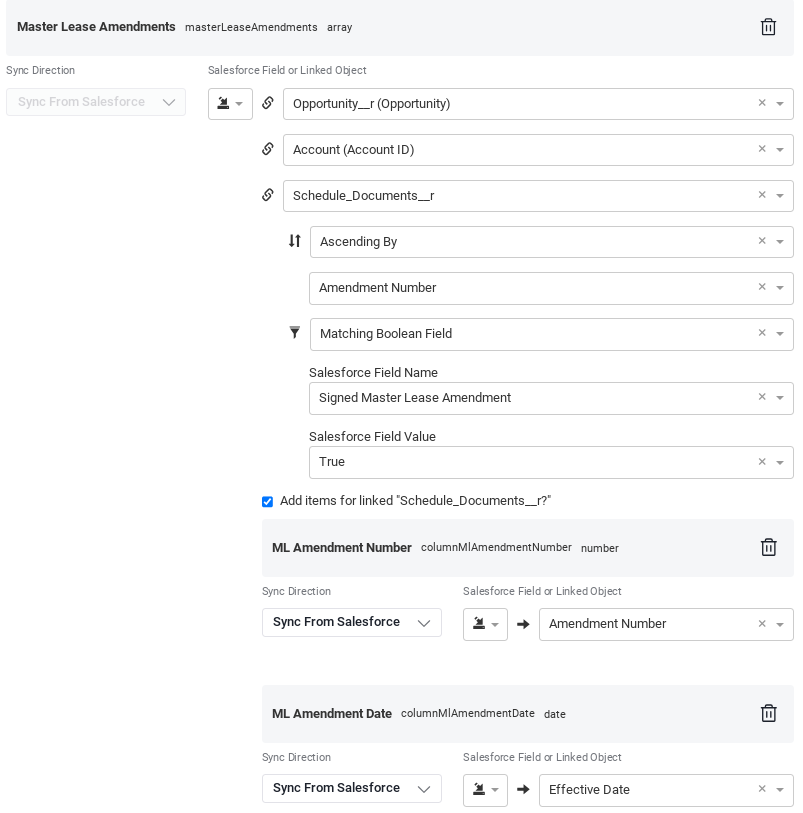
7. Launch the workflow with 0 or more than 1 qualifying Object 2 records. The lookup field will not be populated This is the expected behavior, because we can't assume this should be related to the Workflow.
8. If there were more than 1 Object 2 records, remove or disqualify records until there is only one qualifying Object 2 record.
9. Refresh the workflow from Source with only one qualifying Object 2 record.
If the number of Object 2 records is exactly one, the Lookup field for Object 2 on the Workflow record in Salesforce will be populated with the id of the record from the table. This is incorrect behavior, because we only want the Lookup to Object 1 to be populated on this Workflow. The Lookup to Object 2 should only be populated when we launch a Workflow from Object 2.
Support is looking into this for us, but I wanted to see if anyone else is experiencing this issue.
